
📸 2026 Photo Calendar Contest
Submit your best shots for the upcoming iOps360 Calendar! Voting closes September 5th, so don’t miss your chance to be featured.
Submit your photo here.
👕 Uniform Module
Track issued uniform items, manage staff requests, monitor inventory levels, and view supplier details—all in one place. Staff can now request items directly, and admins can manage fulfillment and returns with ease. Learn more about the full capabilities of the Uniform Module here.
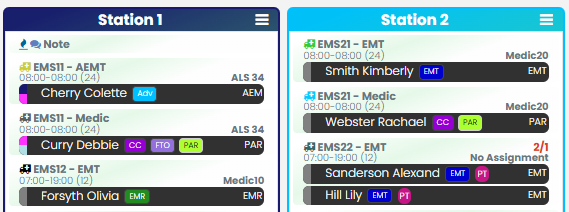
📅 Schedule Day View Enhancements
- Sticky Menus: The Time Off, Swaps, and All Staff menus are now fixed to the page, making them easier to access while scrolling.
- Role Visibility: User roles now appear next to staff names with color-coded abbreviations for quick visual reference.
📏 Schedule Rules & Requirements
We’ve added support for aggregate rules (aka “Together” rules), such as assigning one medic across multiple Ladder 1 positions.
When these rules are active:
- “Click & Get” selections become requests, not direct assignments.
- Auto Staff Availability will skip these rule sets.
📝 Bids
Admins and designated positions can now view event notes directly on the bid view page—providing more context during scheduling.
📂 Employee Tracking
Attachments now include a notes column, making it easier to organize multiple files within a single event.
🕒 Time Off Requests
Need to approve only part of a time off request? You can now split requests in the Edit Time Off popup—perfect for partial approvals.
🧾 Forms
Form editing just got easier. You can now duplicate entire pages within the Form Editor to speed up your workflow.
Keep the great ideas coming and we appreciate all that you do for our communities!